

Description
Download OpenJDK OSX Build – free, secure Java for Mac
Overview
OpenJDK OSX Build is the most up‑to‑date Java runtime for macOS, designed for developers and power users who refuse to wait for Apple’s official Java releases. The project originated from the Mac OS X Port effort that began in 2011, when Apple contributed its own Java source code to the OpenJDK community. Since then, volunteers have kept the macOS build one step ahead of the official Apple version, delivering frequent updates, security patches, and new language features as soon as they land upstream.
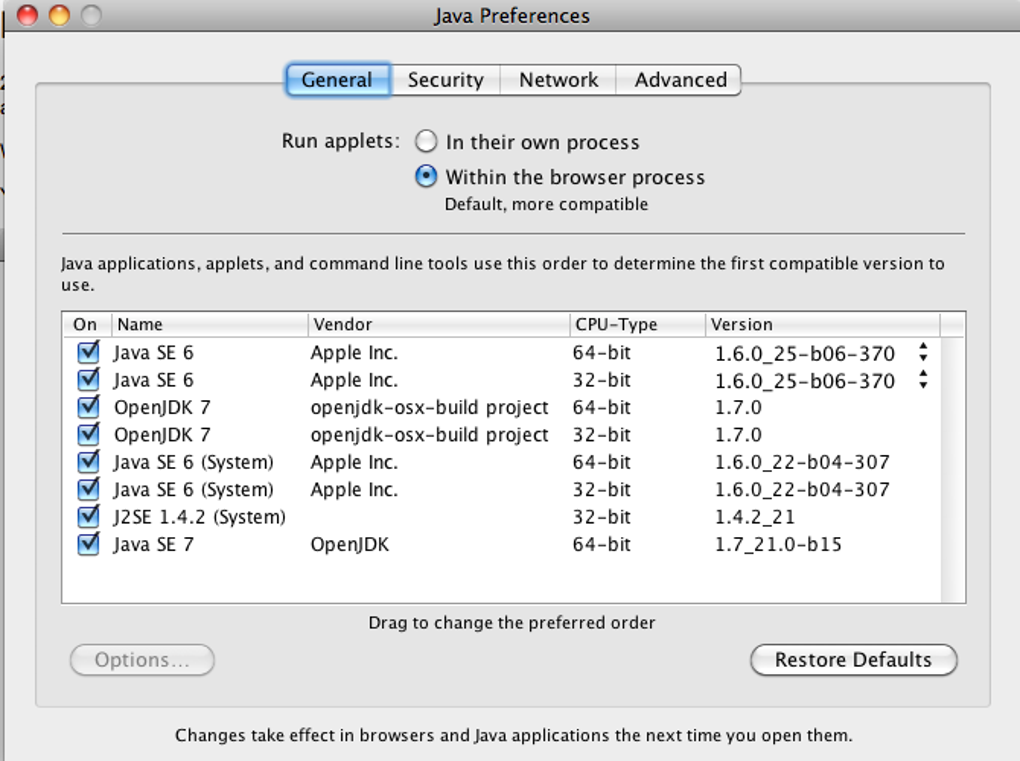
Because it is built on the open‑source OpenJDK codebase, the OSX Build remains completely free to download, use, and redistribute. It follows the same licensing model as the rest of OpenJDK (GPL v2 with the Classpath Exception), meaning you can embed it in commercial applications without worrying about royalty fees. The installer integrates directly into macOS, placing the JDK in /Library/Java/JavaVirtualMachines and adding a System Preferences pane that lets you switch between the Apple‑supplied JDK and the OpenJDK build with a single click.
While the build offers cutting‑edge features—such as the latest Java 21 language enhancements, improved garbage‑collection algorithms, and native support for Apple Silicon—the project is still community‑driven. Users may occasionally encounter stability quirks or rare crashes, especially when running legacy Java applets or tools that rely on deprecated Apple APIs. Nevertheless, for anyone who needs the newest Java capabilities on a Mac, OpenJDK OSX Build is a compelling, secure, and free alternative.
Key Features
- Always‑Current Release Cycle – New JDK versions are packaged within days of the official OpenJDK upstream release.
- Apple Silicon & Intel Support – Native binaries for both ARM‑based M1/M2 chips and legacy Intel Macs.
- Seamless System Integration – Installs to the standard macOS JDK location and adds a Preference‑pane selector.
- Full Java 21 Compatibility – Includes pattern matching for switch, record patterns, and virtual threads.
- Enhanced Security – Immediate delivery of critical CVE patches, TLS 1.3 support, and updated cryptographic providers.
- Open‑Source Transparency – All source code is publicly available on GitHub; contributions are welcome.
- Command‑Line Tools – Bundles
jshell,jlink, andjpackagefor rapid prototyping and packaging. - Automatic Updates – Optional background updater that notifies you when a newer build is ready.
- Compatibility Layer – Provides a compatibility shim for older Java applets that expect Apple‑specific classes.
Each of these features is designed to make the development workflow on macOS as smooth as possible. For example, the native Apple Silicon build eliminates the performance penalty that was once associated with running Java under Rosetta 2. The automatic update mechanism reduces the administrative overhead of manually checking the OpenJDK website, ensuring that your development environment stays secure without extra effort.
Developers who rely on modern Java modules will appreciate the inclusion of jlink, which lets you create custom runtime images that contain only the modules you need. This can dramatically shrink the size of distributed applications and improve launch times. Meanwhile, the integrated System Preferences pane provides a visual way to switch between the Apple‑supplied JDK and OpenJDK, which is especially handy when testing cross‑version compatibility.
Installation, Usage & Compatibility
Step‑by‑Step Installation
- Download the latest
.dmginstaller from the official OpenJDK OSX Build release page. - Open the DMG file and double‑click the
OpenJDK.pkginstaller. - Follow the on‑screen prompts; the installer will request administrator privileges to write to
/Library/Java/JavaVirtualMachines. - After the installation finishes, open System Preferences → Java. You will see a toggle that lets you select “OpenJDK OSX Build” as the active JDK.
- Optionally, enable the “Check for updates automatically” checkbox to receive background notifications of new builds.
Once the JDK is active, you can verify the installation from a Terminal window:
java -version
# Expected output:
openjdk version "21" 2025-09-10
OpenJDK Runtime Environment (build 21+35‑OpenJDK‑Build)
OpenJDK 64‑Bit Server VM (build 21+35‑OpenJDK‑Build, mixed mode, sharing)
System Requirements & Compatibility
The OpenJDK OSX Build supports macOS 12 (Monterey) and later, including macOS 14 (Sonoma). Both Apple Silicon (ARM64) and Intel (x86_64) architectures are covered by separate binaries, so you do not need to install Rosetta on M‑series machines. The installer detects the processor type automatically and places the appropriate version in the JDK directory.
For developers using integrated development environments (IDEs) such as IntelliJ IDEA, Eclipse, or Visual Studio Code, you simply point the IDE to the newly installed JDK path (/Library/Java/JavaVirtualMachines/openjdk-21.jdk/Contents/Home). Most modern IDEs will auto‑detect the JDK after a brief restart, allowing you to compile and run Java 21 projects immediately.
Because the build mirrors the official OpenJDK source, all standard Java libraries and third‑party frameworks (Spring, Hibernate, Apache Maven, Gradle, etc.) work out‑of‑the‑box. However, be aware that some legacy Java applets that depend on Apple’s proprietary com.apple.eawt package may experience compatibility issues. The project provides a lightweight shim to mitigate most of these problems, but occasional crashes can still occur, especially on older hardware.
Pros, Cons & Frequently Asked Questions
Pros
- Always provides the newest Java language features and security updates.
- Native support for both Apple Silicon and Intel Macs.
- Free, open‑source, and GPL‑compatible licensing.
- Simple System Preferences integration for JDK switching.
- Automatic background updater reduces manual maintenance.
Cons
- Being community‑driven, occasional stability glitches may appear.
- Some older Java applets that rely on Apple‑specific APIs may crash.
- No official commercial support; users rely on community forums.
FAQ
Is OpenJDK OSX Build completely free?
Yes. The software is released under the GPL v2 with the Classpath Exception, which allows free use, modification, and distribution, even in commercial products.
Can I run both Apple’s Java and OpenJDK OSX Build side‑by‑side?
Absolutely. The installer places the OpenJDK in a separate directory, and the System Preferences pane lets you toggle which JDK is active without removing the other.
Do I need to uninstall the Apple Java runtime first?
No. The two runtimes coexist peacefully. If you prefer to free up disk space, you can manually remove the Apple JDK, but it is not required for OpenJDK to function.
How often are updates released?
Updates follow the upstream OpenJDK schedule, typically every six months for major releases, with security patches issued as soon as vulnerabilities are disclosed.
Is there a way to contribute to the project?
Yes. The source code is hosted on GitHub, and contributions—whether bug reports, patches, or documentation improvements—are welcomed through pull requests.
Overall Rating: 4 out of 5 stars
The OpenJDK OSX Build offers a remarkably up‑to‑date Java environment for Mac users, with the convenience of native integration and zero cost. Its few stability quirks are outweighed by the rapid access to new language features and security updates.
Conclusion & Call to Action
If you are a macOS developer who wants to stay on the cutting edge of Java without waiting for Apple’s delayed releases, OpenJDK OSX Build is the logical choice. The installer is straightforward, the system‑preferences switch makes version management painless, and the open‑source nature guarantees that you can inspect, modify, or even contribute back to the code base. While occasional crashes may occur—particularly with legacy applets—the benefits of having the latest Java 21 features, improved performance on Apple Silicon, and automatic security patches far outweigh the drawbacks for most professional workflows.
Ready to upgrade your Java development environment? Download the latest OpenJDK OSX Build now and experience a faster, more secure, and future‑proof Java platform on your Mac.
Guides & Tutorials for OpenJDK OSX Build
How to install OpenJDK OSX Build
- Click the Preview / Download button above.
- Once redirected, accept the terms and click Install.
- Wait for the OpenJDK OSX Build download to finish on your device.
How to use OpenJDK OSX Build
This software is primarily used for its core features described above. Open the app after installation to explore its capabilities.
User Reviews for OpenJDK OSX Build 0
No reviews found





.webp)